Print Functions
In this section, we will cover the following functions in-depth listed below:
- uadmin.ALERT
- uadmin.CRITICAL
- uadmin.DEBUG
- uadmin.EMERGENCY
- uadmin.ERROR
- uadmin.ErrorHandleFunc
- uadmin.INFO
- uadmin.JSONMarshal
- uadmin.OK
- uadmin.ReportingLevel
- uadmin.ReportTimeStamp
- uadmin.ReturnJSON
- uadmin.Trail
- uadmin.Version
- uadmin.VersionCodeName
- uadmin.WARNING
- uadmin.WORKING
uadmin.ALERT
// Type: int
const ALERT = 7
ALERT is the display tag under Trail. It is rated as Level 7 (0 being the least priority and 8 being the highest priority).
See uadmin.Trail for the example.
uadmin.CRITICAL
// Type: int
const CRITICAL = 6
CRITICAL is the display tag under Trail. It is rated as Level 6 (0 being the least priority and 8 being the highest priority).
See uadmin.Trail for the example.
uadmin.DEBUG
// Type: int
const DEBUG = 0
DEBUG is the display tag under Trail. It is the process of identifying and removing errors.
See uadmin.Trail for the example.
uadmin.EMERGENCY
// Type: int
const EMERGENCY = 8
EMERGENCY is the display tag under Trail. It is rated as Level 8 (0 being the least priority and 8 being the highest priority).
See uadmin.Trail for the example.
uadmin.ERROR
// Type: int
const ERROR = 5
ERROR is a status to notify the user that there is a problem in an application.
See uadmin.Trail for the example.
uadmin.ErrorHandleFunc
var ErrorHandleFunc func(int, string, string)
ErrorHandleFunc is a function that will be called everytime Trail is called. It receives one parameter for error level, one for error message and one for runtime stack trace.
There are 9 different reporting levels:
- DEBUG
- WORKING
- INFO
- OK
- WARNING
- ERROR
- CRITICAL
- ALERT
- EMERGENCY
Go to main.go and create an invalid code (e.g. Get function that does not meet the standard requirements).
func main(){
    // Some codes

    // Checks error(s) in your application based on a reporting level
    uadmin.ErrorHandleFunc = func(level int, msg string, stack string) {
        if level >= uadmin.WARNING {
            fmt.Println("ERROR MESSAGE:\n" + msg + "\n")
            fmt.Println("STACK:\n" + stack + "\n")
        }
    }

    // This is an invalid code because the first parameter checks the
    // database but assigns an empty string that is unsupported.
    uadmin.Get("", "")
}
Now run your application in your terminal. Based on the output, the error is the Get function where the assigned values are unsupported. The memory address (e.g. 0x977520) are the actual values inside the Get function. Below the message, it also checks which line of code does the error occurs in the file.
ERROR MESSAGE:
DB error in Get(string)-(). unsupported destination, should be slice or struct

STACK:
github.com/uadmin/uadmin.Get(0x977520, 0xaa3330, 0x977520, 0xaa3340, 0x0, 0x0, 0x0, 0x4, 0x8)
    /home/dev1/go/src/github.com/uadmin/uadmin/db.go:242 +0x268
main.main()
    /home/dev1/go/src/github.com/rn1hd/todo/main.go:49 +0x62f
Quiz:
uadmin.INFO
// Type: int
const INFO = 2
INFO is the display tag under Trail. It is a data that is presented within a context that gives it meaning and relevance.
See uadmin.Trail for the example.
uadmin.JSONMarshal
func JSONMarshal(v interface{}, safeEncoding bool) ([]byte, error)
JSONMarshal Generates JSON format from an object.
Parameters:
v interface{}: Is the variable where the model was initialized
safeEncoding bool: Ensures the security of the data
Before we proceed to the example, read Tutorial Part 9 - Introduction to API to familiarize how API works in uAdmin.
Create a file named friend_list.go inside the api folder with the following codes below:
// FriendListHandler !
func FriendListHandler(w http.ResponseWriter, r *http.Request) {
    // r.URL.Path creates a new path called /friend_list
    r.URL.Path = strings.TrimPrefix(r.URL.Path, "/friend_list")
    r.URL.Path = strings.TrimSuffix(r.URL.Path, "/")

    // Fetch Data from DB
    friend := []models.Friend{}
    uadmin.All(&friend)

    // Place it here
    output, _ := uadmin.JSONMarshal(&friend, true)

    // Prints the output to the terminal in JSON format
    os.Stdout.Write(output)

    // Unmarshal parses the JSON-encoded data and stores the result in the
    // value pointed to by v.
    json.Unmarshal(output, &friend)

    // Prints the JSON format in the API webpage
    uadmin.ReturnJSON(w, r, friend)
}
Establish a connection in the main.go to the API by using http.HandleFunc. It should be placed after the uadmin.Register and before the StartServer.
func main() {
    // Some codes

    // FriendListHandler
    http.HandleFunc("/friend_list/", uadmin.Handler(api.FriendListHandler)) // <-- place it here
}
api is the folder name while FriendListHandler is the name of the function inside friend_list.go.
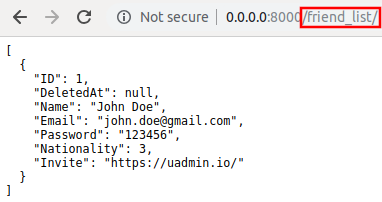
Run your application and see what happens.
Terminal
[
    {
        "ID": 1,
        "DeletedAt": null,
        "Name": "John Doe",
        "Email": "john.doe@gmail.com",
        "Password": "123456",
        "Nationality": 3,
        "Invite": "https://uadmin.io/"
    }
]
API
Quiz:
uadmin.OK
// Type: int
const OK = 3
OK is the display tag under Trail. It is a status to show that the application is doing well.
See uadmin.Trail for the example.
uadmin.ReportingLevel
// Type: int
var ReportingLevel = DEBUG
ReportingLevel is the standard reporting level.
There are 9 different levels:
- DEBUG = 0
- WORKING = 1
- INFO = 2
- OK = 3
- WARNING = 4
- ERROR = 5
- CRITICAL = 6
- ALERT = 7
- EMERGENCY = 8
To assign a value within an application, visit Reporting Level page for an example.
To assign a value in the code, follow this approach:
Let’s set the ReportingLevel to 1 to show that the debugging process is working.
func main() {
    // NOTE: This code works only if database does not exist yet.
    uadmin.ReportingLevel = 1

    // ----- IF YOU RUN YOUR APPLICATION AGAIN, DO THIS BELOW -----

    // Assign the Reporting Level value to 1
    setting := uadmin.Setting{}
    uadmin.Get(&setting, "code = ?", "uAdmin.ReportingLevel")
    setting.ParseFormValue([]string{"1"})
    setting.Save()
}
Result
[   OK   ]   Initializing DB: [13/13]
[   OK   ]   Synching System Settings: [51/51]
[   OK   ]   Server Started: http://0.0.0.0:8080
         ___       __          _
  __  __/   | ____/ /___ ___  (_)___
 / / / / /| |/ __  / __  __ \/ / __ \
/ /_/ / ___ / /_/ / / / / / / / / / /
\__,_/_/  |_\__,_/_/ /_/ /_/_/_/ /_/
What if I set the value to 5?
func main() {
    // Assign the Reporting Level value to 5
    setting := uadmin.Setting{}
    uadmin.Get(&setting, "code = ?", "uAdmin.ReportingLevel")
    setting.ParseFormValue([]string{"5"})
    setting.Save()
}
Result
[   OK   ]   Initializing DB: [13/13]
[   OK   ]   Synching System Settings: [51/51]
         ___       __          _
  __  __/   | ____/ /___ ___  (_)___
 / / / / /| |/ __  / __  __ \/ / __ \
/ /_/ / ___ / /_/ / / / / / / / / / /
\__,_/_/  |_\__,_/_/ /_/ /_/_/_/ /_/
The database was initialized. The server has started. However the error message did not show up because the reporting level is assigned to 5 which is ERROR.
Quiz:
uadmin.ReportTimeStamp
// Type: bool
var ReportTimeStamp = false
ReportTimeStamp set this to true to have a time stamp in your logs.
To assign a value within an application, visit Report Time Stamp page for an example.
To assign a value in the code, follow this approach:
Go to the main.go and set the ReportTimeStamp value as true.
func main() {
    // NOTE: This code works only if database does not exist yet.
    uadmin.ReportTimeStamp = true

    // ----- IF YOU RUN YOUR APPLICATION AGAIN, DO THIS BELOW -----

    // Assign the Port value as "on" to set the value as true
    // in the settings
    setting := uadmin.Setting{}
    uadmin.Get(&setting, "code = ?", "uAdmin.ReportTimeStamp")
    setting.ParseFormValue([]string{"on"})
    setting.Save()
}
If you run your code,
[   OK   ]   Initializing DB: [13/13]
[   OK   ]   Synching System Settings: [51/51]
2018/11/07 08:52:14 [   OK   ]   Server Started: http://0.0.0.0:8080
         ___       __          _
  __  __/   | ____/ /___ ___  (_)___
 / / / / /| |/ __  / __  __ \/ / __ \
/ /_/ / ___ / /_/ / / / / / / / / / /
\__,_/_/  |_\__,_/_/ /_/ /_/_/_/ /_/
Quiz:
uadmin.ReturnJSON
func ReturnJSON(w http.ResponseWriter, r *http.Request, v interface{})
ReturnJSON returns JSON to the client.
Parameters:
w http.ResponseWriter: Assembles the HTTP server’s response; by writing to it, we send data to the HTTP client
r *http.Request Is a data structure that represents the client HTTP request
v interface{} Is the arbitrary JSON objects and arrays that you want to return with
Used in the tutorial:
- uAdmin Tutorial Part 9 - Introduction to API
- uAdmin Tutorial Part 10 - Customizing your API Handler
- uAdmin Tutorial Part 11 - Inserting and Saving the Record
Quiz:
uadmin.Trail
func Trail(level int, msg interface{}, i ...interface{})
Trail prints to the log.
Parameters:
level int: This is where we apply Trail tags.
msg interface{}: Is the string of characters used for output.
i …interface{}: A variable or container that can be used to store a value in the msg interface{}.
Used in the tutorial:
- Document System Tutorial Part 9 - Updating the Document Version
- Document System Tutorial Part 13 - Custom AdminPage function
- Login System Tutorial Part 3 - Sending Request
- Login System Tutorial Part 4 - Login Access Debugging
Trail has 9 different tags:
- DEBUG
- WORKING
- INFO
- OK
- WARNING
- ERROR
- CRITICAL
- ALERT
- EMERGENCY
Let’s apply them in the overriding save function under the friend.go.
// Save !
func (f *Friend) Save() {
    f.Invite = "https://uadmin.io/"

    // Declare temp variable
    temp := "saved"
    // Used DEBUG tag
    uadmin.Trail(uadmin.DEBUG, "Your friend has been %s.", temp)
    // Used WORKING tag
    uadmin.Trail(uadmin.WORKING, "Your friend has been %s.", temp)
    // Used INFO tag
    uadmin.Trail(uadmin.INFO, "Your friend has been %s.", temp)
    // Used OK tag
    uadmin.Trail(uadmin.OK, "Your friend has been %s.", temp)
    // Used WARNING tag
    uadmin.Trail(uadmin.WARNING, "Someone %s your friend.", temp)
    // Used ERROR tag
    uadmin.Trail(uadmin.ERROR, "Your friend has not been %s.", temp)
    // Used CRITICAL tag
    uadmin.Trail(uadmin.CRITICAL, "Your friend has not been %s.", temp)
    // Used ALERT tag
    uadmin.Trail(uadmin.ALERT, "Your friend has not been %s.", temp)
    // Used EMERGENCY tag
    uadmin.Trail(uadmin.EMERGENCY, "Your friend has not been %s.", temp)

    uadmin.Save(f)
}
Run your application, go to the Friend model and save any of the elements inside it. Check your terminal afterwards to see the result.
[  DEBUG ]   Your friend has been saved.
[  INFO  ]   Your friend has been saved.
[   OK   ]   Your friend has been saved.
[ WARNING]   Someone saved your friend.
[  ERROR ]   Your friend has not been saved.
[CRITICAL]   Your friend has not been saved.
[  ALERT ]   Your friend has not been saved.
[  EMERG ]   Your friend has not been saved.
Quiz:
uadmin.Version
// Type: string
const Version = "0.7.4"
Version number as per Semantic Versioning 2.0.0 (semver.org)
Let’s check what version of uAdmin are we using.
func main() {
    // Some codes
    uadmin.Trail(uadmin.INFO, uadmin.Version)
}
Result
[   OK   ]   Initializing DB: [13/13]
[   OK   ]   Synching System Settings: [51/51]
[  INFO  ]   0.7.4
[   OK   ]   Server Started: http://0.0.0.0:8080
         ___       __          _
  __  __/   | ____/ /___ ___  (_)___
 / / / / /| |/ __  / __  __ \/ / __ \
/ /_/ / ___ / /_/ / / / / / / / / / /
\__,_/_/  |_\__,_/_/ /_/ /_/_/_/ /_/
You can also directly check it by typing uadmin version in your terminal.
$ uadmin version
[  INFO  ]   0.7.4
Quiz:
uadmin.VersionCodeName
// Type: string
const VersionCodeName = "Catterpiller"
VersionCodeName is the cool name we give to versions with significant changes. This name should always be a bug’s name starting from A-Z them revolving back. This started at version 0.5.0 (Atlas Moth) 0.6.0 Beetle
uadmin.WARNING
// Type: int
const WARNING = 4
WARNING is the display tag under Trail. It is the statement or event that indicates a possible problems occurring in an application.
See uadmin.Trail for the example.
uadmin.WORKING
// Type: int
const WORKING = 1
WORKING is a tag that is used for animation. It can be used for something like a progress bar that you can show on your console. For instance:
package main

import (
    "time"

    "github.com/uadmin/uadmin"
)

func main() {
    for i := 1; i <= 3; i++ {
        uadmin.Trail(uadmin.WORKING, "%d/3", i)

        // Equivalent to 1 second
        time.Sleep(1000 * time.Millisecond)
    }
    uadmin.Trail(uadmin.OK, "Done!")
}
The application will return a result after you wait for 3 seconds.
[ WORKING]   1/3
[ WORKING]   2/3
[ WORKING]   3/3
[   OK   ]   Done!
See uadmin.Trail for more examples.